

Navigate to the "Vehicle Status" tab and select the Vehicle ID of your choice. A popup will subsequently display various information. If data is visible under both "Mix" and "Discharge" sections, it indicates that the sensors are functioning correctly. (Refer to the example below) :
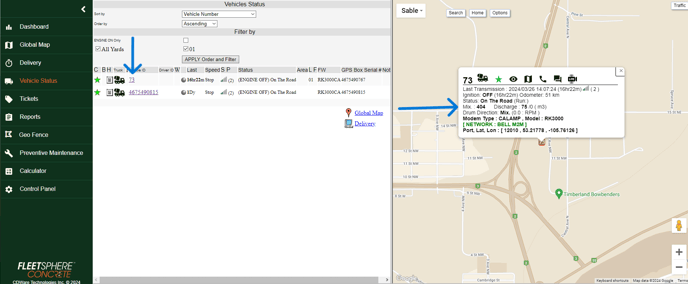
To confirm if the rotation is the right way, put the drum on "MIX" and see if the mix turns are increasing. To check the "DISCHARGE" turns, put mixer on discharge and check if the discharge turns are increasing. If the opposite is happening, just reverse the sensor. Under normal circumstances the drum sensor will have the letter "T" written on it. The "T" stands for TOP." (note: if the truck is a front end discharge, the "T" should be at the bottom)