

Replacement of the charging block (pogo pin) of the ProClip dock for Active3 and Active2 tablets with Molex connector.
 Make sure the charging block to be replaced is unplugged.
Once INGtech confirms with you that the charging block (pogo pin), identified in the following figure, needs to be replaced, please proceed with the following steps:
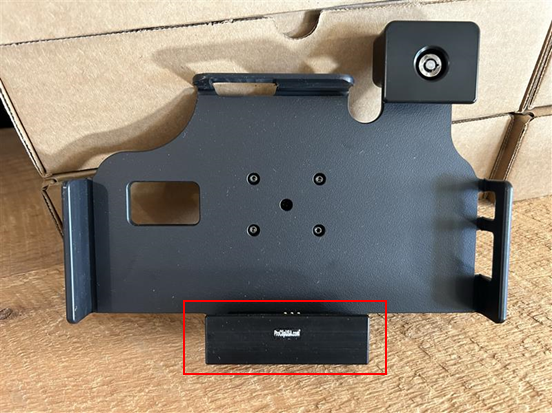
 Steps to follow
- Remove the mobile device from the dock.
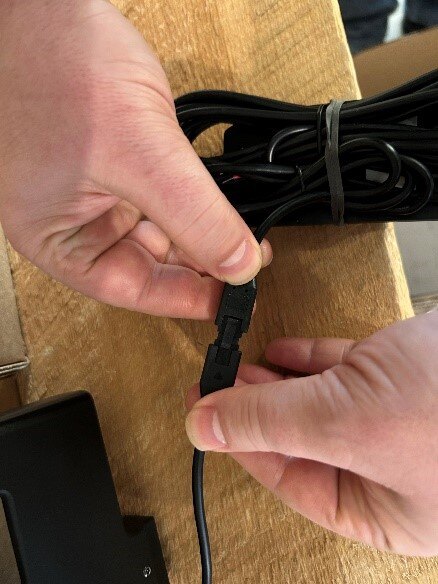
- Disconnect the Molex connector from the charging block.
- Release the dock from the mounting arm by unscrewing one of the two butterfly screws on the mounting arm.
- With the dock in hand, locate the two Torx (10) screws behind the dock near the charging block power cable.
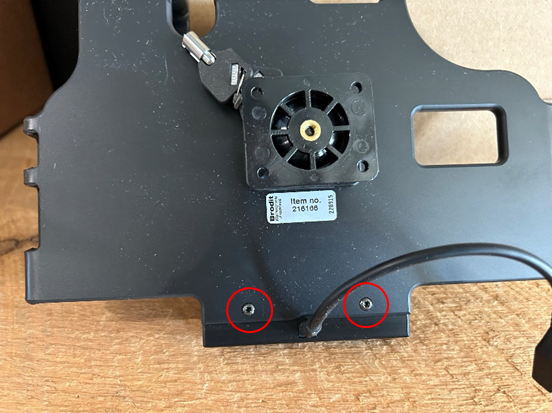
- Unscrew the two Torx 10 screws, replace the charging block with the new charging block.
- Tighten the two Torx screws to secure the charging block to the dock.
- Secure the dock to the mounting arm.
- Connect the power cable of the new charging block to the power converter.
- Place the mobile device back on the dock.
- Verify that the mobile device is charging properly (turn the ignition on if necessary).